





Skip to content
Journal Entry Automation

Elevate
your finance operations

Advanced subscription accounting automation that blends efficiency
and user control.

Journal Entry Automation illustration displaying financial analytics dashboard with pie chart, bar chart metrics, upward growth trend arrows, and analytics controls, representing advanced subscription accounting automation that blends efficiency and user control
Benefits

Precision-built to
empower finance teams

keylight’s Journal Entry Automation simplifies transaction recording, identifies errors,
and handles complex revenue adjustments—fully compliant with GAAP and IFRS.

Journal entry automation icon showing connected workflow boxes, representing seamless automation of journal entries for subscription activities including upgrades, downgrades, and revenue deferrals

Seamlessly connect commercial activities
to journal entries

Automate journal entries for subscription activities, including upgrades, downgrades, and revenue deferrals.

Automated revenue adjustments icon showing calendar with plus adjustment symbol, representing elimination of errors through automated booking of journal adjustments for current or subsequent accounting periods

Eliminate errors with automated revenue adjustments

Ensure accurate revenue calculations as keylight books journal adjustments for the current or subsequent accounting period.

Audit readiness icon showing certificate badge, representing review of detailed transaction events and consolidation of precise data for general ledger and financial reporting to ensure audit compliance

Ensure audit readiness
with a reliable financial
data framework

Review detailed transaction events and consolidate precise data for the general ledger and financial reporting.

Journal Entry Automation

Capability overview

Transaction Records

Automate journal entries for all subscription activities and their
related transactions. 

 Deferred Revenue
 Reconciliation Events

 AR / AP / Other Ledgers
 GL Integration
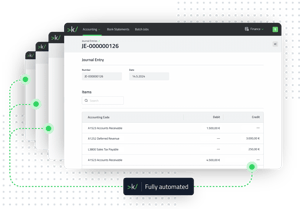
keylight Journal Entry interface displaying transaction record with Items showing accounting codes, representing fully automated journal entries for subscription activities and related transactions including deferred revenue, reconciliation, AR/AP, and GL integration

Smart Adjustments

Simplify journal adjustment processes through automated accounting period validation and correction rules.

 Discrepancy Detection
 Foreign Exchange Losses & Gains 
 Voiding & Write-Offs
 Journal Correction Types
 Batch Jobs
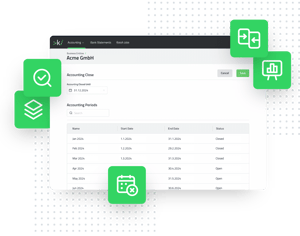
keylight Smart Adjustments interface displaying accounting configuration with Accounting Close date, Accounting Periods table, and automated adjustment features for discrepancy detection, foreign exchange gains/losses, voiding, write-offs, and batch job processing

Journal Entry Statistics

Enhance financial transparency with
lean records and generate comprehensive reports from structured data.

 Effective Transaction Events
 Custom Journal Entry Reports

 Audit Trail
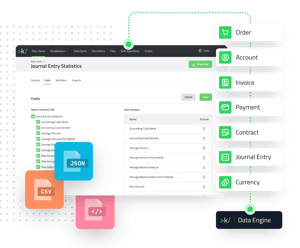
keylight Journal Entry Statistics interface showing Data View with 19 selectable fields, sort configuration, export options, and connected data entities for enhanced financial transparency and audit trails
All Capabilities

Faster and more accurate
journal entry workflows

Green square icon with rounded corners displaying two white bidirectional arrows pointing left and right, representing transaction records and automated journal entry processing for accounting and billing management systems

   Transaction Records

Automate journal entries with rules

Configure billing and accounting policies to streamline accounting processes.

-

Deferred revenue icon showing wallet with database, representing definition of revenue recognition rules to automate journal entries based on contract termsDeferred Revenue
Define revenue recognition rules to automate journal entries based on contract terms.

-

Reconciliation events icon showing circular flow with connection points, representing seamless reconciliation processes that auto-record validated transactions in keylight Reconciliation Events
Enable seamless reconciliation processes in keylight to auto-record validated transactions.

-

AR, AP and other Ledgers icon showing ledger document with entries, representing automatic posting of journal entries to ledgers aligned with your accounting frameworkAR / AP / Other Ledgers
Automatically post journal entries to ledgers aligned with your accounting framework.

-

GL Integration icon showing connected data blocks, representing easy export of data and synchronization with ERP systems to streamline financial workflowGL Integration
Easily export data or synchronize with your ERP system to streamline your financial workflow.

Green rounded square icon featuring three white vertical slider controls with circular adjustment knobs, representing smart adjustments and automated journal correction features for accounting automation and validation logic

   Smart Adjustments

Automate your journal corrections

Validate the accounting period and book the appropriate entry using sophisticated automation logic.

-

Discrepancy detection icon showing bidirectional arrows between documents, representing easy identification of inconsistencies in journal entries and accounting recordsDiscrepancy Detection
Easily identify inconsistencies in your journal entries and accounting records.

-

Foreign exchange losses and gains icon showing currency conversion arrows, representing easy automation of adjustments needed for changes in currency conversion ratesForeign Exchange Losses & Gains
Easily automate adjustments needed for changes in currency conversion rates.

-

Voiding and write-offs icon showing document with cancellation mark, representing simplification of tasks associated with voiding transactions and writing off uncollectible itemsVoiding & Write-Offs
Simplify tasks associated with voiding transactions and writing off uncollectible items.

-

Journal correction types icon showing document folder with checkmark, representing booking of appropriate journal entry types for corrections and adjustmentsJournal Correction Types
Book the appropriate journal entry type for corrections and adjustments.

-

Batch jobs icon showing stacked layers, representing use of filters and conditions to execute bulk corrections efficientlyBatch Jobs
Use filters and conditions to execute bulk corrections efficiently.

Green rounded square icon displaying three white vertical bar chart columns of varying heights, symbolizing journal entry statistics and transaction monitoring for advanced accounting data analytics and structured reporting views

   Journal Entry Statistics

Monitor transaction and journal entry events and create structured data views for clear reporting.

-

Effective transaction events icon showing checklist with bank institution symbol, representing summarization of transaction events to a final entry pre-period close for a lean journal recordEffective Transaction Events
Summarize transaction events to a final entry pre-period close for a lean journal record.

-

Custom Journal Entry Reports icon showing magnifying glass, bar chart, and curved arrows representing data analysis and financial transparencyCustom Journal Entry Reports
Create custom data views based on journal entry data for financial transparency.

-

Green rounded square icon featuring a white magnifying glass overlaid on a document with horizontal lines representing checklist items and text fields, symbolizing audit trail functionality for traceable transaction and journal activity recordsAudit Trail
Rely on an event-based engine for traceable records of transaction and journal activities.

keylight Platform

A subscription system that
is ready for the future

Request a demo