

Skip to content
Multi-Level A/B Tests

Uncover insights end-to-end

Optimize your strategies in well-designed test environments, from first engagement to every subsequent customer touchpoint.

Multi-Level A/B Testing illustration displaying test design interface with pie chart analytics, optimization tools (alignment, drop, draw, scale icons), and user controls for designing test environments across customer engagement touchpoints

Multi-Level A/B Tests benefits icon showing interconnected orbits, representing event-driven test logic that enables easy design, configuration, and execution of tests for understanding customer behaviors Benefits


Event-driven
test logic


Multi-Level A/B Tests is uniquely crafted by our mathematicians, allowing users to easily design, configure, and execute tests for understanding customer behaviors.

Customer insights icon showing user profile with magnifying glass, representing discovery of insights at every customer touchpoint including landing pages, upgrade journeys, and customer portal interactionsUncover insights at every customer touchpoint

Conduct tests on landing pages, during upgrade journeys, in the customer portal, and beyond.

+

Test groups icon showing user profile with list details, representing creation of contained test environments for precise customer group segmentation and deeper insightsMinimize risks with precise test groups

Create contained environments easily and gain deeper insights into specific customer groups.

+

Experiment icon showing thumbs up with interface window, representing testing of UX/UI elements and journey-based experiments to uncover strategies that boost engagement and revenueExplore from snapshots to business scenarios

Test UX/UI elements or extend to journey-based experiments to uncover strategies that boost engagement and revenue.

Multi-Level A/B Tests

Capability overview

Test Levels

Experiment across various environment scales and refine elements with subtests and test items.

checkmarkApplication Level
checkmark Components

checkmarkOrder Journeys
checkmarkSubtests

keylight Test Levels illustration showing hierarchical testing across Application Level, Components (invoice checklist), and Order Journeys (address f

Test Groups

Precisely segment prospects and customers to minimize risks and enhance test validity.

 Filters & Conditions
 Split Weight
 Smart Caching
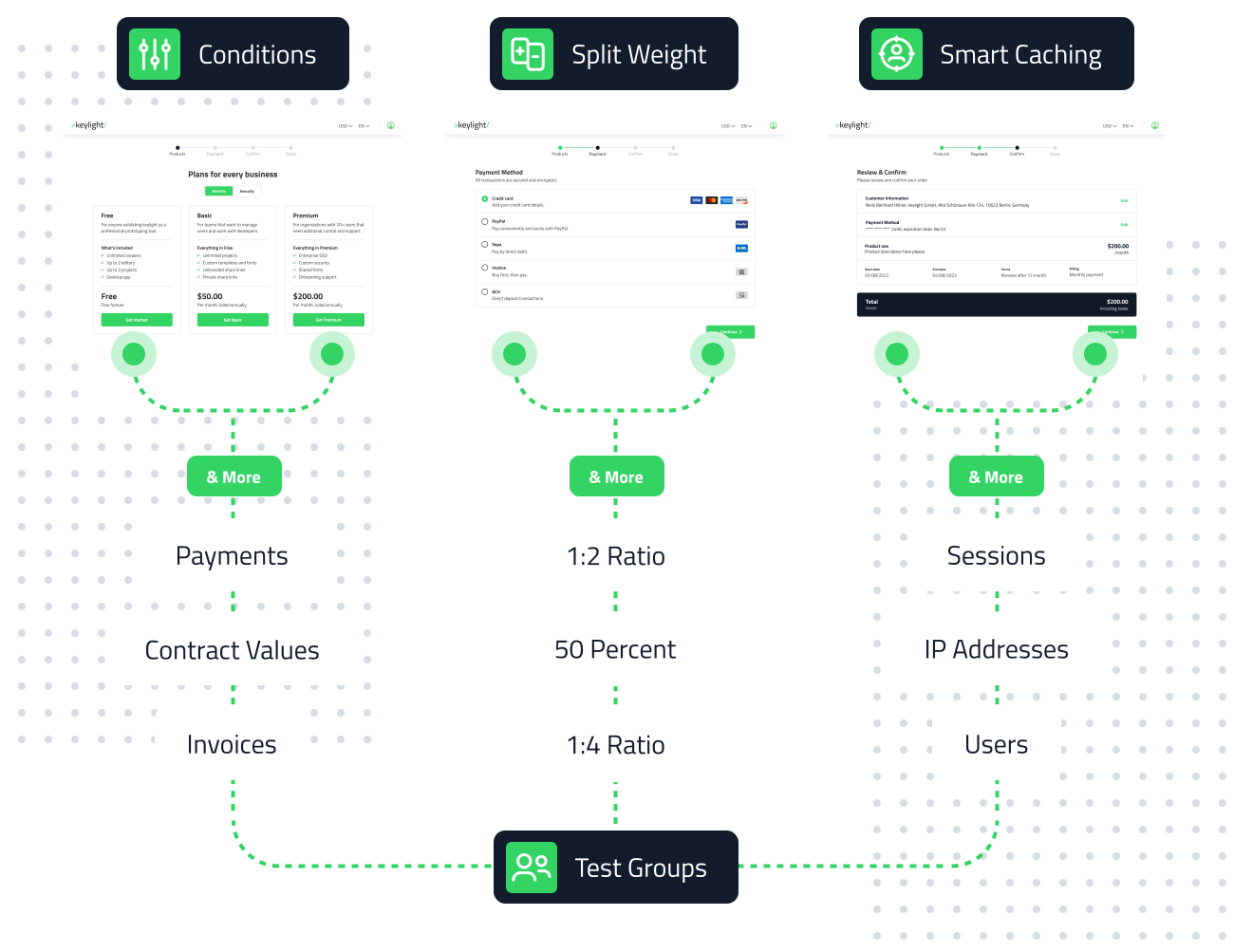
keylight Test Groups illustration showing Conditions, Split Weight, Smart Caching, and segmentation filters for test group creation-1

Test Items & Rules

Create test elements from buttons, fonts, colors, themes, to a fully designed business scenario.

 A/B Tests
 Multivariate Tests
 Scenario Tests
 Logic Automation
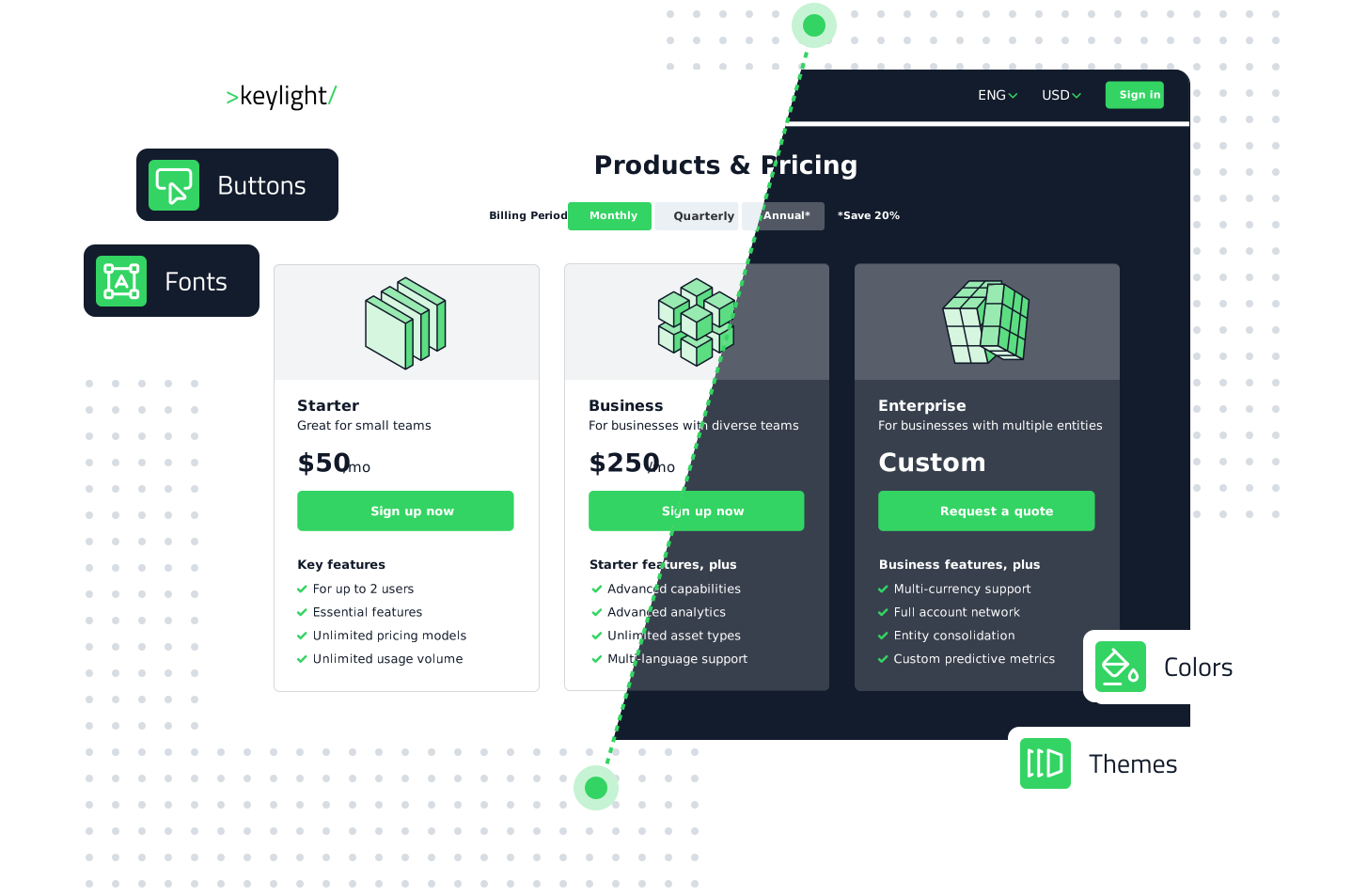
keylight Test Items & Rules illustration displaying Products & Pricing page with three pricing tiers and customization options for Buttons, Fonts, Colors, and Themes for A/B, multivariate, and scenario testing
All Capabilities

Sophisticated experiments
made simple

Test levels icon showing layered stacked elements, representing selection of testing environment and deciding the scale of experiment from application to component to order journey levels

   Test Levels

Select a testing environment

Choose the starting point of your test, and decide the scale of your experiment.

-

Application level icon showing paint bucket, representing experimentation with themes, components, and fonts at the application levelApplication Level
Experiment at the application level with themes, components, and fonts.

-

Components icon showing toggle switch, checkbox, and radio button, representing experimentation at the component level in customer and partner portalsComponents
Experiment at the component level in the customer or partner portal.

-

Order journeys icon showing workflow path with play button, representing experimentation with shop, checkout, forms, and other order journey stepsOrder Journeys
Experiment with shop & checkout, forms, or any other order steps.

-

Subtests icon showing grid of test boxes, representing creation of subtests at any level to fine-tune experiments for different scenariosSubtests
Create subtests at any level to fine-tune your experiment for different scenarios.

Test groups icon showing two user profiles, representing segmentation of prospects and customers and definition of how keylight identifies them upon return to the test environment

   Test Groups 

Segment prospects & customers

Define the test group and how keylight identifies them upon their return to the test environment.

-

Filters and conditions icon showing adjustment sliders, representing use of subscription activities and contract data to segment prospects and customersFilters & Conditions
Use subscription activities and contract data to segment prospects and customers.

-

Split weight icon showing boxes with plus and minus controls, representing adjustment of test group distribution numbers among variantsSplit Weight
Adjust numbers to define how test groups are distributed among variants.

-

Smart caching icon showing user profile in target circle, representing test group caching preferences set by browser, IP address, or user loginSmart Caching 
Set test group caching preferences by browser, IP address, or user login.

Test items and rules icon showing adjustment sliders, representing definition of variants and conditional logic to combine test levels and items from UI elements to strategic business scenarios

   Test Items & Rules

Combine test levels and items to run tests from UI elements to strategic business scenarios.

-

A/B tests icon showing A and B variants in circular flow, representing comparison of two variants to identify the more effective optionA/B Tests
Compare two variants to identify the more effective option.

-

Multivariate tests icon showing multiple stacked layers, representing testing of multiple variants to see how elements interact and affect customer behaviorMultivariate Tests
Test multiple variants to see how elements interact and affect the customer behavior.

-

Scenario tests icon showing signpost, representing combination of test levels and subtests to evaluate comprehensive business scenariosScenario Tests
Combine test levels and subtests to evaluate comprehensive business scenarios.

-

Logic automation icon showing gear with automation controls, representing management of test environments with rules that automate subtest adjustments or pausesLogic Automation
Manage test environments with rules that automate subtest adjustments or pauses.
keylight-logo-3
The subscription business platform
that's ready for the future